Is WordPress the Best CMS for a Custom Website? Advantages and Alternatives
If you’re planning a new website or redesigning an existing one, sooner or later you’ll face the question of what to build it on. WordPress, an alternative platform, or a completely custom CMS? This decision will affect not only what your website can do today, but also its future development, management, and costs. That’s why we’ll look at the main advantages and disadvantages of WordPress, as well as situations where an alternative may be a better choice.
Looking for a WordPress website without limitations?
We’ll design and develop a custom WordPress website tailored to your brand, with functionality built around your needs and a solid technical foundation ready for future growth.
What Does a Custom Website Mean, and Why Does the Choice of CMS Matter?
A custom website doesn’t mean that the entire system has to be programmed from scratch. The design, structure, functionality, integrations with internal systems, or even the way website content is managed can all be custom-built. WordPress can serve as the technical foundation and administration interface, while the website itself is designed and developed specifically around the company’s needs. WordPress makes it possible to create custom themes, plugins, content types, and API integrations.
However, WordPress is also frequently used as a quick template-based solution, which often gives it a somewhat undeserved reputation. That’s why it’s important to distinguish between:
- A WordPress template website – the website is adapted to the limitations of an existing template. This isn’t a custom solution, but rather a matter of replacing images and text and making minor design adjustments using Elementor, Divi, or another page builder.
- A custom WordPress website – the design and functionality are developed specifically according to the project requirements, while WordPress is used only as the content management system.
In practice, WordPress can provide the foundation for both a simple corporate website and a more complex solution with a unique design, custom data structures, and bespoke integrations. Choosing WordPress therefore doesn’t determine how simple or advanced the final website will be.
Why Is WordPress So Popular?
WordPress holds a clearly dominant position among CMS platforms. According to current W3Techs data from September 7, 2026, it is used by approximately 40.7% of all websites.
However, many websites don’t use a CMS at all—their content is edited directly in HTML or PHP, particularly on very old websites. Among websites where a CMS could be identified, WordPress has a market share of approximately 58.9%.
Thanks to its enormous popularity, WordPress has a vast ecosystem of themes, plugins, developers, documentation, and third-party tools. WordPress also provides official documentation for developing themes and plugins, working with the REST API, and using other interfaces. The platform itself is open source, and its development is supported by a large community of dedicated developers.
For businesses, this primarily means the confidence of using a stable long-term solution, flexibility in development, and the freedom to choose between different development partners.
1. WordPress Can Be Used to Build a Truly Original Website
One common misconception about WordPress is that every website has to be built on a ready-made template. In reality, a developer can create a custom theme, custom page templates, blocks, and separate content types. This allows the website to have a unique design and an administration interface tailored to what the company actually needs to manage.
Instead of relying on a generic administration setup, you can have separately managed services, projects, references, team members, branches, or case studies, for example. WordPress supports custom post types as well as custom templates, so the website structure does not have to be limited to standard pages and blog posts.
A WordPress Website Does Not Have to Look Like a “WordPress Website”
WordPress determines how content is managed, not how the website looks. With a custom website, the design can be created entirely from scratch, making it indistinguishable from websites built on other custom platforms. WordPress themes allow developers to define their own structure, templates, and visual treatment for individual parts of the website. At the same time, the administration remains flexible, without requiring a developer whenever you want to change text, replace images, add sections, create pages, and so on.
You can also see different approaches to design and functionality in our portfolio, where websites are designed around the specific needs of individual clients.
2. Functionality Can Be Expanded as Needed
Professional WordPress website development does not mean installing dozens of plugins and hoping they all work together. WordPress also makes it possible to create custom plugins and develop functionality specifically for a given project without modifying the WordPress core itself. This can be used to build features such as forms, booking systems, user accounts, catalogs, member areas, or custom business logic.
For e-commerce functionality, WordPress can be extended with WooCommerce, an open-source e-commerce platform built directly on WordPress.
One of the advantages is that the website does not need to include every feature from day one. A company can start with a simple corporate website and later add a product catalog, client portal, or other functionality. New features can be added on the same foundation through plugins and custom development. If the system is set up properly from the beginning, even major future changes do not have to become a nightmare in terms of either cost or deadlines.
3. WordPress Can Be Easily Integrated with Other Systems
A modern business website often does not operate in isolation. WordPress provides a REST API and tools for communicating with external APIs, allowing it to send data to or receive data from other applications. This makes it possible to create integrations with systems such as CRM, ERP, newsletter platforms, payment or booking systems, external databases, or mobile applications.
In practice, this means you do not have to manage the same data manually in multiple places. A website can, for example, retrieve data from an external system or send information submitted through a form to another application.
WordPress Can Also Work as a Headless CMS
WordPress does not necessarily have to handle the website’s frontend presentation itself. In a so-called headless setup, it can serve purely as a system for managing and publishing content, while the frontend is developed separately. Content can be transferred between the two, for example, through the WordPress REST API, which makes WordPress data available to other applications.
4. You Can Manage Content Without a Developer
A custom website does not mean that you need a programmer every time you want to change a piece of text or replace an image. The WordPress administration interface can be configured around the needs of each individual website. This means you can easily manage content such as services, references, team members, articles, products, branches, or FAQs, while individual content types can have their own fields and structure.
Adding and editing pages is, of course, standard functionality. If the website is well built, pages can also be assembled easily from predefined blocks or sections, while selected design elements can remain editable. At the same time, the developer can define exactly what can be changed and what remains fixed, helping to preserve the visual consistency of the website.
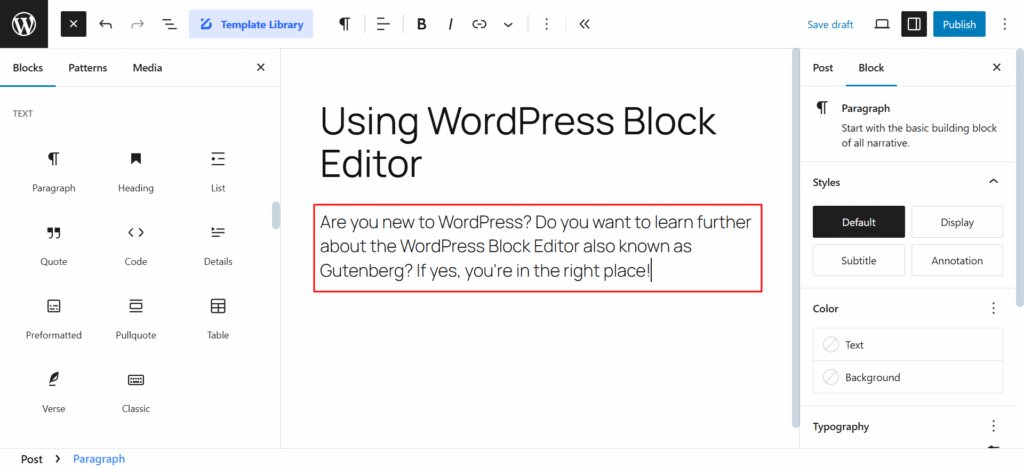
Screenshot of the WordPress Block Editor
5. A High Level of Control Over SEO
One of the major advantages of WordPress is the high level of control it provides over the technical implementation of SEO. WordPress natively works with title tags and meta descriptions, allows you to configure URL structure, generates canonical links for standard individual pages, and includes its own XML sitemap and robots.txt file.
Additional capabilities can be added depending on the needs of the project. Reliable SEO plugins make it possible to manage elements such as metadata, redirects, indexing, and structured data. On multilingual websites, solutions such as WPML can also automate hreflang tags and correctly connect different language versions. Internal linking, meanwhile, remains fully under the control of the content editor.
It is important to remember, however, that WordPress itself does not guarantee high search rankings. Google, Bing, and AI-powered search engines evaluate a website based on its content, technical accessibility, and many other factors—not on whether it was built with WordPress.
6. A Solid Foundation for a Fast Website
WordPress is neither inherently fast nor slow, but it provides a solid foundation for building a fast website:
- automatic optimization of excessively large images,
- generation of multiple image sizes for different screen widths,
- a database architecture designed for efficient data retrieval, and
- a wide range of proven plugins for caching and JavaScript and CSS minification.
Of course, there are also other factors that WordPress itself cannot control, such as:
- hosting,
- database performance, which is closely related to hosting,
- the number and quality of plugins—the more processes that need to run in the background, the slower the website can become,
- the size of JavaScript and CSS files, and, of course,
- the code of the theme itself.
WordPress provides a very good foundation for creating fast websites, but the final result depends on how developers make use of that foundation. An optimized theme, high-quality hosting, properly configured caching, and optimized media are all factors that WordPress cannot compensate for if they are neglected during development—it simply has no way to do so.
Custom WordPress vs. a Page Builder
With a custom WordPress website, developers primarily load only what the specific design and functionality actually require. A general-purpose theme or extensive page builder such as Elementor or Divi, on the other hand, often includes more styles, scripts, and features than a particular page actually uses.
This can often result in slower page loading even with better hosting. That said, a page-builder website can also be optimized, just as a website coded from scratch can still be slow. These cases, however, tend to be the exception rather than the rule.
7. Security Comes First
WordPress has been helping websites manage content for more than 20 years. Over the course of operating in a constantly changing environment, it has developed a robust system for identifying and addressing security issues within the platform, including:
- a dedicated security team,
- a formal process for handling security issues,
- a code review process,
- vulnerability reporting procedures,
- processes for testing fixes, and
- the release of security updates.
In some cases, critical security fixes are also provided to older versions through automatic updates.
The security of a specific website, however, also depends to a large extent on its maintenance. The WordPress core, themes, and plugins need to be updated regularly, and the website should use components that are actively maintained. Plugins and themes should come from trusted sources, not cracked or unverified downloads found online. Secure hosting configuration and regular backups are equally important.
User accounts should not be overlooked either. A strong, unique password makes attacks based on guessing login credentials significantly more difficult, and ideally, multi-factor authentication should also be enabled. If a hacker obtains valid administrator credentials, there is little the CMS itself can do—the system has no way of knowing that it is not really you logging in, and an administrator has permission to do virtually anything to the website, including breaking it.
WordPress is therefore an actively maintained CMS with mature security processes. WordPress websites do not simply get hacked for no reason. The risk increases when untrustworthy plugins are installed or maintenance is neglected. After all, if someone effectively invites an attacker inside, who is to blame—the system or the person who let them in? And if a website is running on a version from five years ago, how can it be expected to withstand today’s attack methods?
8. WordPress Is Open Source, Giving You Full Control Without Licensing Fees
WordPress itself is free, open-source software released under the GPL license. Its source code is publicly available and can be modified to suit the needs of a particular project.
Of course, building and operating a WordPress website still involves costs. At a minimum, you need to pay for hosting. If you choose to use a premium theme or plugin, that represents an additional expense, and naturally, website development and maintenance are not free either. However, there is no fee for the WordPress license itself.
At Vigeo, for example, we build WordPress websites so that our clients pay for nothing beyond hosting and development. You do not pay for premium plugins or themes, because smart development also makes financial sense.
What Are the Disadvantages of WordPress?
WordPress offers a great deal of flexibility, but that flexibility also comes with a certain level of responsibility. Compared with many alternative platforms, you have greater control over the technical solution, but you also need to maintain it properly and develop it thoughtfully over time.
Regular Maintenance
A website should not simply be launched and then left to gather dust. It needs updates to the WordPress core, themes, and plugins, regular backups, and, for more important websites, monitoring of uptime and unusual changes.
WordPress supports automatic updates for many components and includes tools such as Site Health, but its long-term operation should still be checked regularly. This is a standard part of ongoing WordPress website maintenance.
Every Plugin Should Be Chosen Carefully
The huge plugin ecosystem is both an advantage and a potential source of problems. Not every plugin is equally well coded, actively developed, or supported over the long term.
Unnecessary or outdated plugins can negatively affect website performance, compatibility, and security. We therefore recommend using up-to-date plugins from trusted sources and removing any plugins that are no longer in use.
That does not mean that a high-quality WordPress website should avoid plugins altogether, nor does it mean that it should use dozens of them. With professional development, every plugin should be chosen carefully and serve a specific purpose. Where appropriate, functionality can instead be developed specifically for the project.
What Are the Main Alternatives to WordPress?
WordPress is not the only way to build a professional website. The right choice depends on what the website needs to do, who will build and manage it, and how it is expected to evolve in the future.
Webflow
Webflow makes particular sense for design-focused marketing websites and teams that want to create and edit a large part of the website visually. The platform combines visual development, a CMS, and hosting in a single environment, allowing custom layouts to be created without having to program every part of the frontend in the traditional way. For more advanced requirements, it can also be extended with custom code and APIs.
The main disadvantages are recurring platform fees and more limited development options. You do not own the platform’s source code, and you can only build what the platform allows you to build.
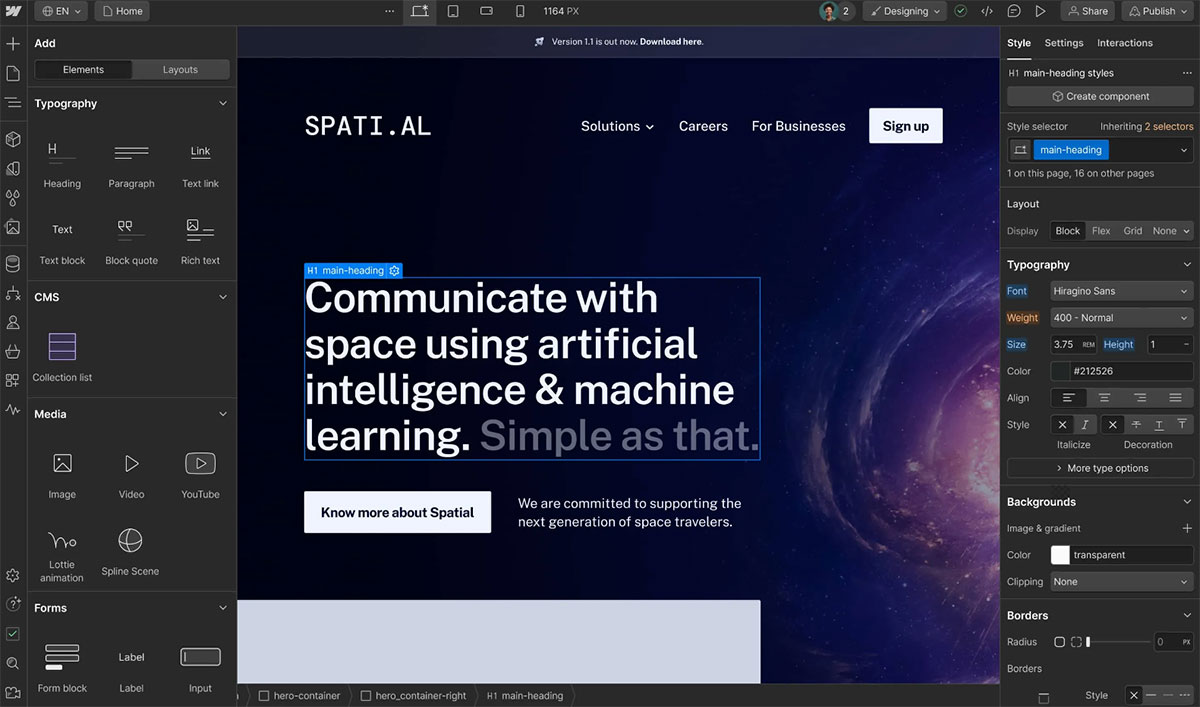
Screenshot of the Webflow template editor
Wix and Squarespace
Wix and Squarespace can be good options for simpler business websites, portfolios, or projects where the priority is launching quickly and being able to build a large part of the website yourself.
Both platforms offer visual drag-and-drop tools, ready-made templates, and hosting as part of the service. In exchange for this simplicity, however, you pay not only a monthly fee, but also accept a technical solution that is more tightly tied to a specific platform than an open-source CMS.
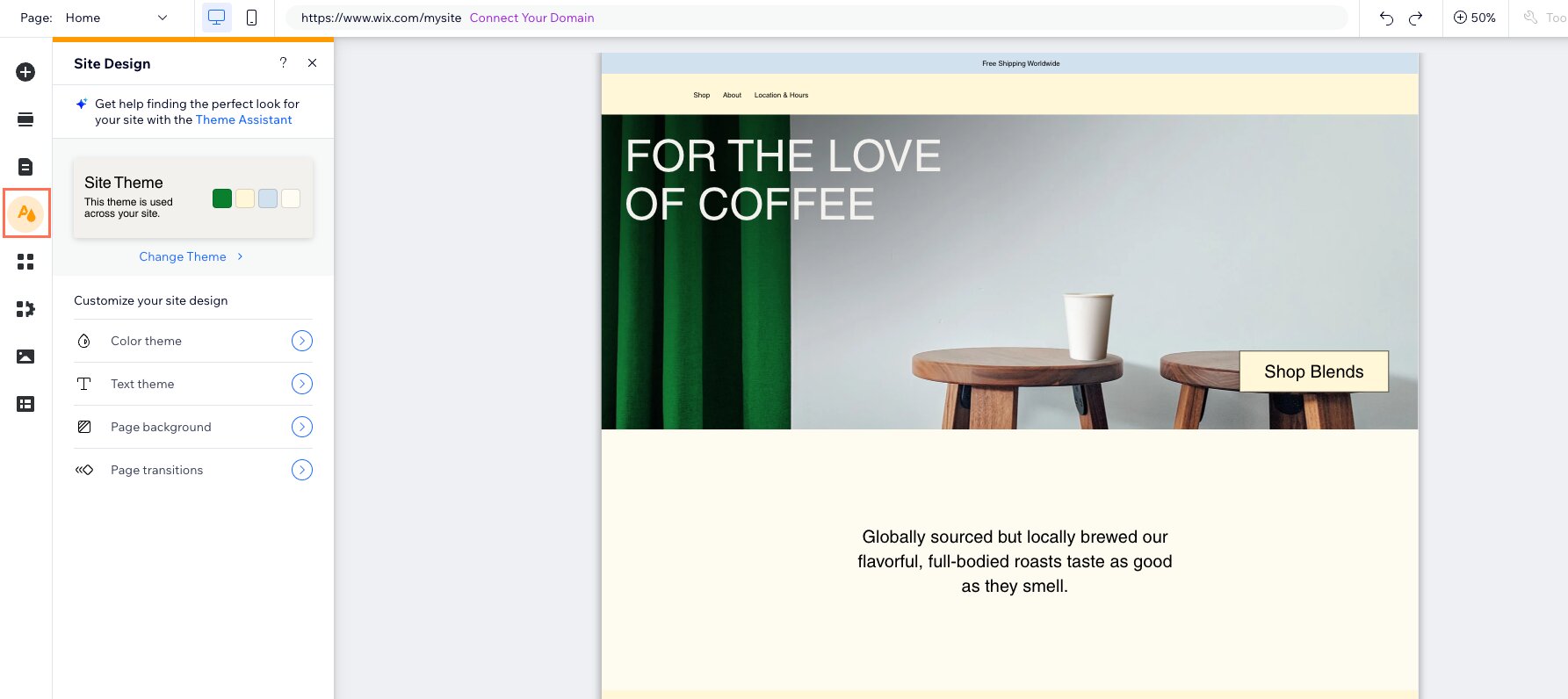
Screenshot of the Wix template editor
Drupal
Like WordPress, Drupal is an open-source CMS, but it is often used for more complex projects where advanced workflows, content management, permissions, or enterprise requirements are important.
The software itself is free and open source, but implementing a complex Drupal solution generally requires an experienced development team. Finding replacement developers can also be more difficult, and the vast majority of corporate or presentation websites are not complex enough to justify this type of solution.
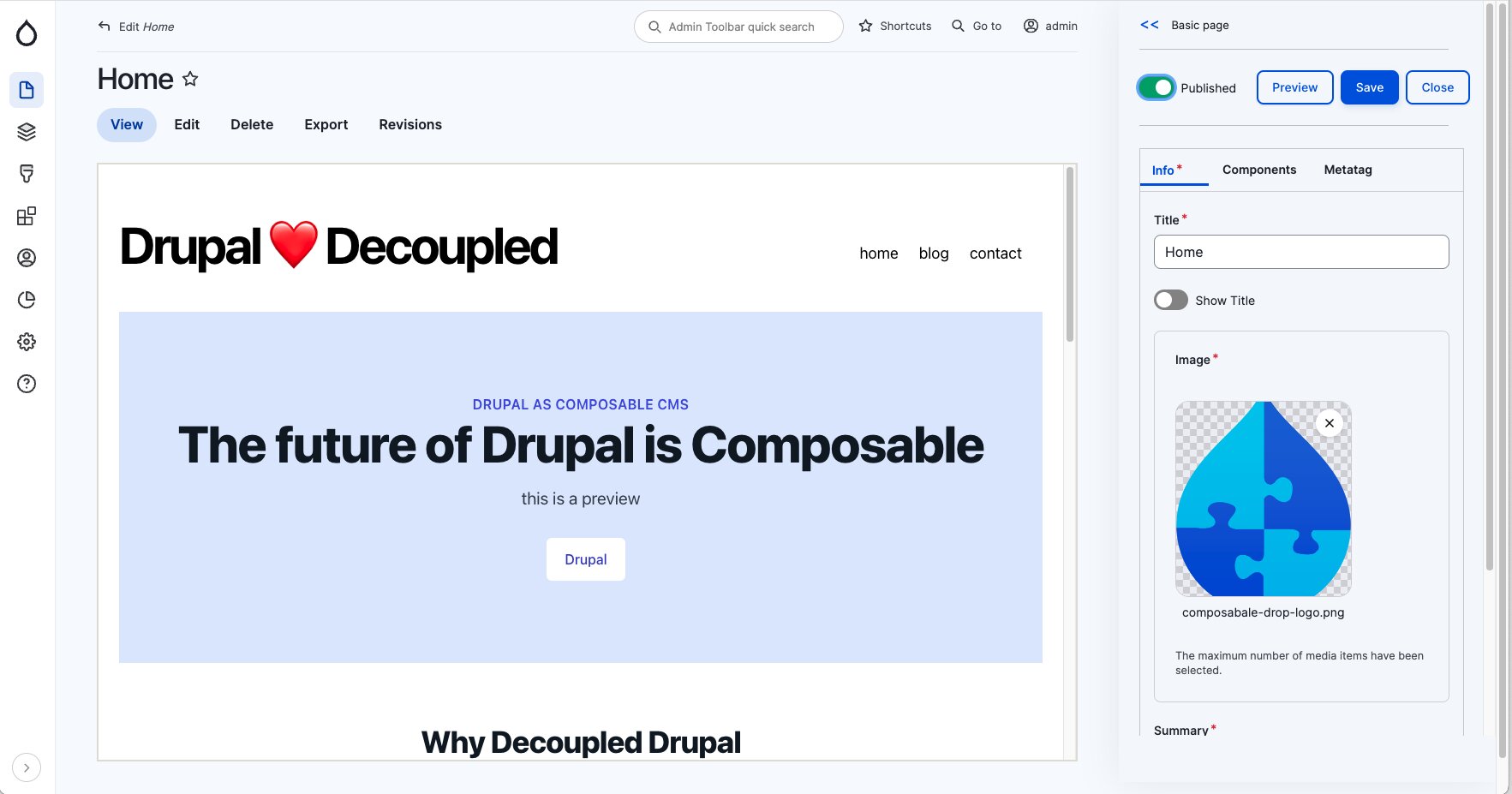
Screenshot of the Drupal visual editor
Custom CMS or Web Application
For some projects, adapting an existing CMS may not make sense at all. If the core of the product is not content publishing and management, but rather highly specific processes, a custom data model, or application logic, a bespoke solution is usually more appropriate.
Typical examples include large internal systems, specialized customer portals, or web applications where the CMS represents only a small part of the overall product.
Comparison of the Options
| Biggest advantage | Best suited for | Price | |
|---|---|---|---|
| WordPress | Full control and a strong foundation for development | Business and marketing websites, magazines, and e-commerce websites with their own development team | Free |
| Webflow | Visual development | Design-focused marketing websites | From $15/month* if you want to publish on your own domain |
| Wix | Easy to build yourself | Smaller and simpler websites | From $17/month* if you want to publish on your own domain |
| Squarespace | Simple all-in-one platform | Portfolios and simpler business websites | From €11/month* |
| Drupal | Complex workflows and enterprise systems | Large and specialized content-driven projects | Free |
| Custom CMS / application | Maximum flexibility for specific logic | Unique applications and processes | Development costs |
*Prices change regularly. For current pricing, we recommend checking the platform’s official website.
Is WordPress Really the Best Choice for a Custom Website?
For a large proportion of professional business and marketing websites, yes. It combines the features that matter most for this type of website:
- custom design,
- simple content management,
- support for custom functionality and external integrations,
- a high level of control over SEO, and
- the ability to continue developing and expanding the website over time.
At the same time, it is a free and open-source solution that can be migrated between hosting providers and further customized without any mandatory licensing fee for the CMS itself.
WordPress’s greatest strength is not one specific feature, but the combination of capabilities it offers. A company can get a website designed entirely around its own needs, manage the content independently, and later expand the solution with new sections, integrations, or functionality.
Conclusion
WordPress is not a universal answer for every web project. For custom websites, however, it offers a very strong combination of flexibility, control, extensibility, security, and easy content management. Before choosing a CMS, it is therefore important to define what your website needs to handle today and where you expect it to be several years from now.
For specific examples of custom websites built with WordPress, take a look at our portfolio. Not sure whether WordPress is the right solution for you, or need help with its development?
Contact us for a no-obligation consultation.
Frequently Asked Questions About WordPress
Yes. WordPress is not only for small business websites or blogs. With a well-designed architecture, it can manage large amounts of content, custom data types, user roles, integrations, and bespoke functionality. The limits of a specific solution depend more on its technical architecture than on WordPress itself.
WordPress itself is free. However, the cost of a custom website depends on the scope of the design, functionality, integrations, content migration, and other aspects of the project. Feel free to contact us for a no-obligation quote.
No, provided the administration interface is designed properly. Routine content updates, such as editing text, services, references, articles, products, FAQs, or team members, can be handled by the company itself. A developer is mainly needed for changes to functionality, the design system, or the technical architecture.
WordPress provides very good options for the technical implementation of SEO, but using WordPress alone does not guarantee better search rankings. Results depend on content, the technical quality of the website, internal linking, speed, and many other factors. The main advantage of WordPress is the high level of control it provides over how SEO is implemented.
WordPress has its own security team, a responsible vulnerability disclosure process, and regularly releases security updates. However, website security also depends heavily on regular updates, the trustworthiness of plugins, and the security of user accounts.
A WordPress website can be moved to another hosting provider at any time, and its management can be taken over by another developer or agency. WordPress’s large ecosystem reduces dependence on a single provider, although how easy a project is to hand over will always depend partly on the quality of the original implementation.
In the vast majority of cases, yes. During a redesign, the existing content and database can be preserved while a new design or technical solution is built around them. With larger changes, the outcome depends on the skill of the development team, but in general, you should not lose any data.
Yes, most commonly in combination with WooCommerce. This setup provides a high degree of control over the store and its extensions. For some projects, however, a specialized platform such as Shopify may be more efficient.